Sunday, June 29, 2014

Enter to Safe Mode Windows 10

If you want to start Windows 10 with Safe Mode

• In normal Windows, go to Run command by pressing combination keys Windows+R 
• Type msconfig then click Ok or hit Enter key
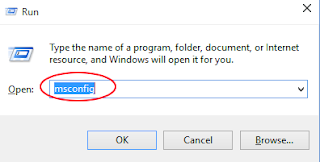

Will appear System Configuration window
• Choose Boot tab.
• Under Boot options, give a tick at Safe boot.
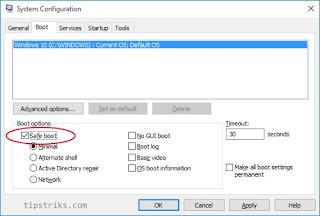

• Click Ok,
• Will appear the warning that the computer will restart, choose Restart.

Windows will run in the Safe Mode.


Other way to enter Safe Mode in Windows 10

• Open the Start menu,
• Click Power.
• Press and hold Shift key (at the keyboard), and click Restart. Hold the Shift key until Windows is ready again with Choose an option page.
• In Choose an option page, choose Troubleshoot
Read more »


Friday, June 27, 2014

Run Hyper Terminal in Windows 10

Hyper Terminal is still used to configure devices like Switch/hub, Router box, etc, but In Windows 10 (also Windows 8, and Windows 7) you will not find the Hyper terminal application.
The Last supported Windows to the Hyper Terminal is Windows XP.

You can run Hyper Terminal in Windows 10 by copying the 2 files related to the Hyper Terminal from Windows XP.
Copy the 2 files hypertrm.exe and file hypertrm.dll from Windows XP located in folder :
1.  \Program Files\Windows NT\hypertrm.exe
2.  \WINDOWS\system32\hypertrm.dll

Paste the 2 files to the same folder in Windows 10.
Open hypertrm.exe to run the program

If you don't have Windows XP, you can download from my Skydrive/One drive, link is here.

Thursday, June 26, 2014

How To Show Android Name in My Tablet / Smartphone

In the Android device, Computer tablet or smartphone, when you go to About device /About phone from the Setting menu, you will see the version of Android, only the version, not the name of Android like : Honeycomb,  Ice Cream Sandwich, etc.
How to show the Android  Name ?

There is a secret way to show  the Android  name.
Go to Setting menu and choose About phone or About device, you will see the Android version
Read more »

Wednesday, June 25, 2014

Repairing Universal Laptop Adapter

I have a laptop universal adapter, I like it because can be used for all my laptops, although my laptops have different brand.

Last week it couldn't be used, no electrical output, the lamp indicator was die.

Before I decided to buy the new one. I tried to open the cover, and check what is the cause of the problem.
Finally I noted, the problem was caused by a cracked tin. It may happen for hot circuit or high current/voltage.

I took the soldering iron and the tin to repair it.
Now it is back to normal.


Bellow are the steps what I did :

• Unplug/disconnect the electric input
• Remove the screws using screw driver

2 screws must be taken out using screw driver
• Open  the cover, I used a big minus screw driver.
• See the picture, red arrow show the cracked tin on the pin of the Power IC


At 50x Zoom you will see :
Read more »

Saturday, June 21, 2014

How to Repair Broken Button Blackberry 8520 8530

If you still have old Blackberry Curve 8520 or 8530, generally you will get the problem around the buttons, volume button, shortcut button, at left and right side of your Blackberry, the rubber or plastic of the buttons are damaged because of life time of usage.

Damaged button of Blackberry 8520/8530
If the main function is still good, and you still want to use it, you can repair this blackberry by change the chassis.
Read more »

Friday, June 20, 2014

How to know the wifi channel already used

When you will install wi-fi (access point) device, especially if the wifi device more than one, two or three, then you should pay attention to the wifi channel, because if the channel setting of each device is not correct, the  interference may be happen that may cause the connection to be slow or even dropped.

In general, default settings of wifi device  for the channel is set to automatically, when there are existing wifi signal, the new wifi device  will seek and occupy unused channel.

But just to be safe if you are confident in your area has wifi signal and you will install the new one, the channel should be set up manually. to avoid interference between the devices.
Channel menu on wifi device generally will be found in Wireless section, refer to your device  manual instruction.

The easy way to know wi-fi channel already used in the area, I use Wifi Analyzer, the App for Android. Easy to use and has good measuring result.
Take your Android device, go to Play Store,  search using keyword:  Wifi Analizer , choose the Wifi Analizer from farproc with the logo:


Read more »

Thursday, June 19, 2014

Use old laptop battery for Power bank

If your laptop/notebook or netbook has been changed the battery unit with the new one. don't waste the old battery unit although it doesn't work anymore. Because generally inside the battery unit, not all the battery cell are bad. even in more case, in the battery unit that has 6 battery cells only one or two battery cells have malfunction. One cell has a problem, it will cause the battery unit becomes malfunction.


Use the cutting pliers to rip the battery cover, or you have the other way, up to you.
Take out all the batteries, generally has model 18650 battery, be care full don't make short circuit.


You have to know the polarity which Positive and negative


Use the 18650 battery charger to know it still can be charged or not, you can see the LED indicator, if not charging means the battery is bad.
(You can buy 18650 battery charger from online market, from Aliexpress the price below 2 dollars)


Can be used for Power Bank

There are many Powerbanks in the market have real capacity not the same as they write in the specifications, the real is below what they wrote.

You can build your own Power Bank with best capacity using old battery from your laptop, because original battery from laptop has best quality.

You must have the Power Bank case, you can buy from anywhere. In the Aliexpress store there are many model of Power bank casing for sale, buy the case for the 18650 battery model. with 5 or 6  batteries. The price is not expensive.
Example Power Bank with 6 batteries
Use the batteries already selected from old laptop battery
See the polarity positive and negative, don't make a mistake. In all Electronic devices using the battery, the battery terminal with 'spring' is negative.
Read more »