On the Guest Operating system / VM (Virtual machine) in VMWare Workstation , if you want to go to BIOS setting menu or want to set boot priority, etc, by pressing ESC key, F2 key, etc, usually you will not be able to reach it, because the process is too fast.
To be able to enter Bios setting,You can do by setting delay time before the system launch the operating system
You must set the Configuration file (vmx file) of the Virtual Machine.
Open VMX file using Notepad then add the following code:
bios.bootdelay = "5000" and then Save it.
Read more »
Showing posts with label VM. Show all posts
Showing posts with label VM. Show all posts
Saturday, November 1, 2014

Tuesday, September 9, 2014
Add License Key to VMware ESXi 5
Last week when I would like to activate the VMware ESXi 5 license through vSphere client, I was confused because I didn't know where the menu location for entering the license key.
I found it after take a long time look for.
To enter the license key for VMware ESX 5 using Vsphere client :
Select ESX host
Go to Configuration tab
Inside Software section, choose Licensed Features
At the right of page you will see the Edit..., click it
Read more »
I found it after take a long time look for.
To enter the license key for VMware ESX 5 using Vsphere client :
Select ESX host
Go to Configuration tab
Inside Software section, choose Licensed Features
At the right of page you will see the Edit..., click it
Read more »
Wednesday, April 2, 2014
Enabling ESXi Shell Direct Console ESXi 5
Different with VMware ESX/i 4.1 and older, In the VMware vSphere ESXi 5.0 and newer ( 5.1, 5.5, and ESXi 6) you can't access the ESXi shell or remote using SSH because by default the settings are disable.
To make enable accessing ESXi Shell by direct or remote using SSH :
• Go directly to the host
• Press F2 Key (Customize System/View Logs)
• Login using Administrator/root account
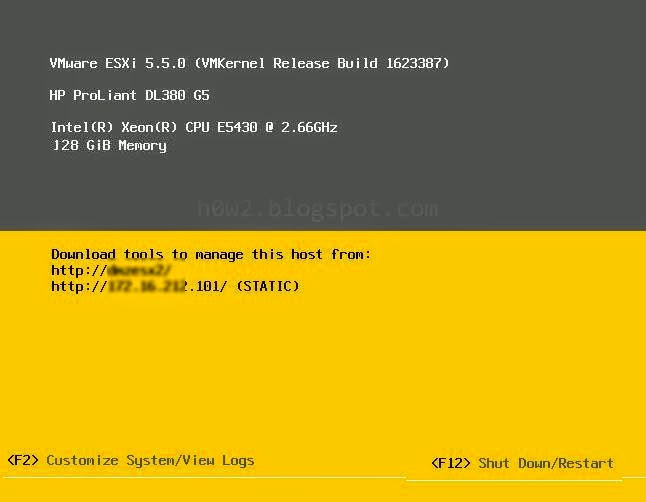
• Choose Troubleshooting Options, (use arrow key at the keyboard to highlight, then press Enter)
Read more »
To make enable accessing ESXi Shell by direct or remote using SSH :
• Go directly to the host
• Press F2 Key (Customize System/View Logs)
• Login using Administrator/root account
• Choose Troubleshooting Options, (use arrow key at the keyboard to highlight, then press Enter)
Read more »
Thursday, March 6, 2014
How to set Automatic Startup VM in VmWare ESX
If you want your VM computer auto start when the host computer is powered on, in VMware vSphere ESX, ESX4 or ESX 5 using VMware vSphere client.
1. Open VMware vSphere client.
2. Go to Configuration tab.
3. Choose Virtual Machine Startup/Shutdown menu.
4. Click Properties.

5. Give a tick on the Allow virtual machines to start and stop automatically with the system.
6. Choose the virtual machine you want to become automatically start, click Move up and put on the automatic area.

1. Open VMware vSphere client.
2. Go to Configuration tab.
3. Choose Virtual Machine Startup/Shutdown menu.
4. Click Properties.
5. Give a tick on the Allow virtual machines to start and stop automatically with the system.
6. Choose the virtual machine you want to become automatically start, click Move up and put on the automatic area.
Friday, February 21, 2014
Go to Bios in VMware Workstation 10
In the VMware Workstation 10 , if you want your VM Computer to go to BIOS setting or you want to choose boot order, etc, it will be difficult if using general hotkey such as F2 or Escape, because the process is too fast.
The way to enter to the BIOS in VM computer in VMware Workstation 10 is using the menu provided in Power menu:
1. Select the VM computer you want to set
2. Go to VM menu
3. Choose Power
4. Choose Power On to BIOS
Read more »
The way to enter to the BIOS in VM computer in VMware Workstation 10 is using the menu provided in Power menu:
1. Select the VM computer you want to set
2. Go to VM menu
3. Choose Power
4. Choose Power On to BIOS
Read more »
Thursday, July 18, 2013
How To Set/Enter ESX 4 License key via VClient

Where is menu for entering the license key of VMware ESX 4 through VClient?
• Click on the host (IP)
• Go to Configuration tab
• Click Licensed Features (in the Software area)
Read more »
Thursday, June 27, 2013
Running Windows 8 or Windows Server 2012 On Esx 4

If you are using Vmware ESX 4 (4.0 or 4.1) and want to have / install windows 8 or Windows 2012 Virtual machine on it but you still don't decide to have VMware vSphere 5, (because only on vsphere 5, windows 8 and windows server 2012 can be created). fortunately you still be able to have Windows 8 / server 2012 on Vmware vsphere 4 with a little trick.
Read more »
Subscribe to:
Posts (Atom)